Product Overview
DB-Backup Manager is a database backup management application for administrators who need a reliable way to protect business databases. It replaces fragile scripts, manual exports, and scattered backup folders with a clear backup-console workflow.
The application helps IT teams connect to database servers, select databases, create backup jobs, schedule automatic runs, copy backups to storage destinations, send email alerts, review history, and restore safely when needed.
Core Capabilities
Backup jobs
Create jobs per server or workload, enable schedules, run manually, and monitor status from the dashboard.
Database connections
Connect to MySQL, MariaDB, PostgreSQL, and SQL Server environments depending on engine and plan support.
Database selection
Select one database, multiple databases, or all non-system databases for each job.
Destinations
Store backups locally, on external drives, NAS/network shares, SFTP, OneDrive Personal, OneDrive for Business, Google Drive, or future cloud targets.
Scheduling
Run backups manually or by daily, weekly, monthly, or configured-time schedules.
Retention
Automatically remove older backups by age, count, or complete incremental chain retention rules.
Notifications
Send success, failure, and warning emails with useful backup details for IT teams.
History and restore
View backup history, inspect logs, and restore with explicit confirmation before destructive operations.
Supported Database Engines
| Engine | Backup method | Restore method | Notes |
|---|---|---|---|
| MySQL | mysqldump | mysql client | Full and binary-log incremental chains. |
| MariaDB | mariadb-dump or mysqldump | mysql/mariadb client | Full and binary-log incremental chains. |
| PostgreSQL | pg_dump | psql | Full logical backups in the current Windows core. |
| Microsoft SQL Server | BACKUP DATABASE | RESTORE DATABASE | Server-side .bak backup and restore workflow. |
Backup tools are important because they are the proven database-native tools that create consistent backups and reliable restores. The application provides scheduling, UI, security, history, destinations, and automation around those tools.
Storage Destination Guides
Open Destinations, add or select a destination, configure it, run the available connection and write tests, enable it, and save. Then edit the backup job and select that destination.
Local Folder or External Drive
Select Local and enter an absolute Windows folder such as D:\DatabaseBackups. The application account and Windows service account need create, write, read, and delete permissions. Use Test Write Permission before assigning the destination to a job.
NAS or Network Share
Select NAS / Share and enter a UNC path such as \\SERVER\Backups\Database. Enter a dedicated network-share account when the Windows service account does not already have access. Confirm that both the desktop application and service can reach the share, then run the write test.
SFTP Server
Select SFTP, enter the server, SSH port, username, password, and remote folder. Use a restricted account that can write only to the required backup folder. Test the connection and write permission before enabling the destination.
OneDrive Personal
Select OneDrive Personal, enter a folder such as DatabaseBackups/MySQL, and click Connect OneDrive. Complete Microsoft sign-in in the system browser, return to the application, test the connection, enable the destination, and save it.
OneDrive for Business
Select OneDrive Business, choose the backup folder, and click Connect Microsoft 365. Sign in with a work or school account. The product owner must configure the official Microsoft public-client Application ID; enterprise administrators can optionally use their own tenant and application registration.
Google Drive
Configure the Google Drive desktop OAuth client ID and secret in Settings > Cloud Destinations. Then select Google Drive, choose a backup folder, click Connect Google, complete browser sign-in, test the connection, enable the destination, and save it. The application requests the limited drive.file scope.
Backup Workflow
- Connect to the database server. Enter host, port, user, password, database type, and optional SSL/TLS settings.
- Select databases. Fetch available databases and choose what should be protected.
- Select destinations. Choose local folders, NAS/network shares, SFTP, or cloud destinations according to plan support.
- Configure schedule and retention. Decide when backups run and how long old backup files are kept.
- Enable notifications. Send backup result emails to success and failure recipients.
- Run and verify. The application creates, compresses, optionally encrypts, verifies, copies, logs, and cleans up the backup.
database-name_server-name_2026-06-21_19-45-00.sql.gz. Encrypted files use .sql.gz.enc.
Backup Tools Page
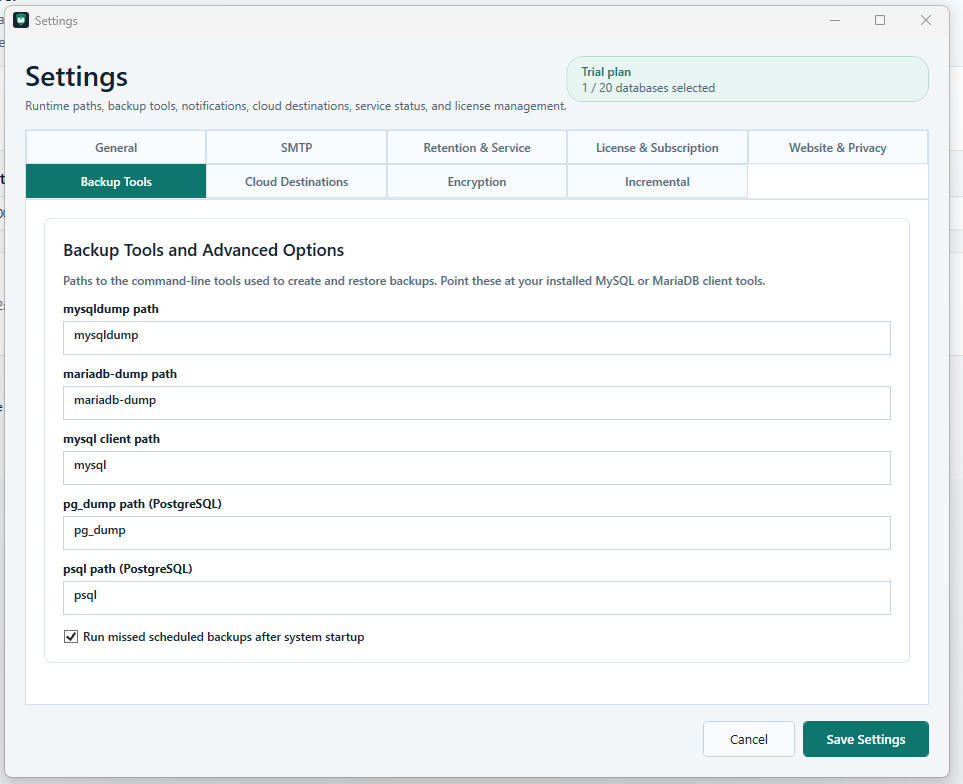
The Backup Tools page configures paths to command-line tools such as mysqldump, mariadb-dump, mysql, pg_dump, and psql.
If these tools are available in the Windows PATH, the simple command name is enough. Otherwise, administrators can enter the full path, for example C:\Program Files\MySQL\MySQL Server 8.0\bin\mysqldump.exe.
This page is important because the backup engine depends on these tools to create and restore database backups correctly.
Restore and Safety
Restore is designed as a controlled administrator action. The application requires explicit confirmation before running a restore and can require the user to type RESTORE before destructive restore operations.
- Encrypted backups are validated before touching the target database.
- Incremental chains are checked for missing files or broken steps before restore.
- Restore logs are stored for later review.
- Production overwrite should never happen without explicit administrator confirmation.
Deployment Modes
Windows standalone application
Designed for Windows 10, Windows 11, and Windows Server. It includes a WPF desktop dashboard, system tray behavior, local SQLite storage, and a Windows Service for scheduled backups after logout.
Writable data is stored under C:\ProgramData\DatabaseBackupManager.
Dockerized web application
Designed for centralized internal browser access. It includes login, jobs, destinations, history, restore, settings, users, and audit sections.
This mode is useful when several administrators need a shared internal backup console.
Security and Reliability
- Encrypted database passwords.
- Encrypted SMTP passwords.
- Encrypted backup files when enabled.
- No clear-text password display after saving.
- Audit logs for important actions.
- User-friendly error messages.
- ProgramData storage for writable app data.
- Internal-network deployment by default.
- HTTPS-only license API configuration.
- No database contents sent to the licensing website.
Licensing and Subscription Model
DB-Backup Manager supports free, trial, monthly, yearly, and custom license plans. The customer-facing software shows license activation, current plan, subscription status, protected database limit, current usage, upgrade, and customer portal actions.
| Plan | Typical use | Example limits |
|---|---|---|
| Free | Testing or one protected database. | 1 backup job or 1 protected database. |
| Trial | Evaluation period. | Paid features for a limited duration. |
| Starter | Small teams. | Several protected databases, scheduling, NAS, email. |
| Professional | IT departments. | More databases, multiple destinations, restore, encryption. |
| Business | Larger environments. | Advanced retention, incrementals, SQL Server, reporting. |
| Enterprise | Custom deployments. | Custom limits, offline activation, larger support scope. |
Admin license generation tools should not be included inside the customer desktop or web software. License creation, revocation, subscriptions, trial keys, and Stripe/webhook integration belong in the website/admin portal.
GDPR / DSGVO and German Market Compliance
The product is designed with data minimization in mind. The application should not upload backup files, database contents, database credentials, SMTP passwords, cloud tokens, internal paths, or internal database names to the licensing website.
The website should provide a privacy policy, terms, Impressum, cookie notice if needed, and DPA/AVV option for business customers. These documents must be reviewed by a qualified legal professional before commercial launch.
Website and Advertisement Copy
Headline
Professional database backup automation for MySQL, MariaDB, PostgreSQL, and SQL Server.
Subheadline
Schedule, encrypt, monitor, and restore database backups from a clean Windows and web console built for internal IT teams.
Short description
DB-Backup Manager gives administrators one place to configure database backup jobs, choose backup destinations, schedule automatic runs, receive email alerts, review backup history, and restore safely when something goes wrong.